Loading...
GritBD WorksConnect complex execution data
Connect complex execution data
in one workspace
GritBD Works is a team collaboration service for projects, tasks, calendars and meeting notes.
Sync schedules with Google Calendar and import Google documents you select to summarize meetings and organize follow-up tasks.
Start right away with your GritBD Hub account · Create a workspace without approval
Google integration
Connect your calendar and selected documents to your work
AX-Workspace, shown on the Google consent screen, is the Google integration app for GritBD Works. Calendar connection and document import are each optional.
Calendar sync and scheduling
Works syncs Google Calendar events and attendee information and checks availability. With separately granted write permission, you can use calendar export, bookings and Google Meet features.
Import only documents you choose
Choose a Google Doc in the Google file picker to save its name and text as a new meeting note. Works does not automatically collect documents attached to calendar events. Importing a document does not change the Google source or your existing events and notes.
Text summaries and task suggestions
Imported note text and the names and identifiers of projects you can access are sent to the Anthropic API to produce summaries and task suggestions. Google data and derived data are not used to train or fine-tune general-purpose AI models.
GritBD Works does not use Google APIs or Google user data for image generation, including the creation of non-consensual intimate imagery (NCII).
Problem
Once a project starts,
execution information scatters across countless tools
Unclear progress
After a project starts, it's hard to see the actual progress and milestone status at a glance in real time.
Fragmented information
Meeting notes, individual tasks, schedules and files are scattered across different platforms like Slack, Notion and email.
Communication breakdowns
Team members and external partners look at different versions of materials, causing updates to misalign and friction to arise.
Lost history
After a project ends, critical business context and key problem-solving history aren't accumulated — they just disappear.
SlackNotionExcel
Work time wasted every day
on manual sharing and missed handoffs
Process
Seven manual steps
in one workspace
Scattered manual workflow
Time spent on repeated entry and information gathering
- Project start
- Messenger invite
- Meeting
- Task entry
- Calendar entry
- Weekly report
- Information gathering
7 manual steps in total
Connected automated workflow
Execution data connected automatically
- Create project
- Extract tasks from meeting notes
- Schedules & notifications synced automatically
Connected in one workspace
When you start using GritBD Works
For everyone,
with no waste,
automatically.
Connect complex execution data
in one workspace.
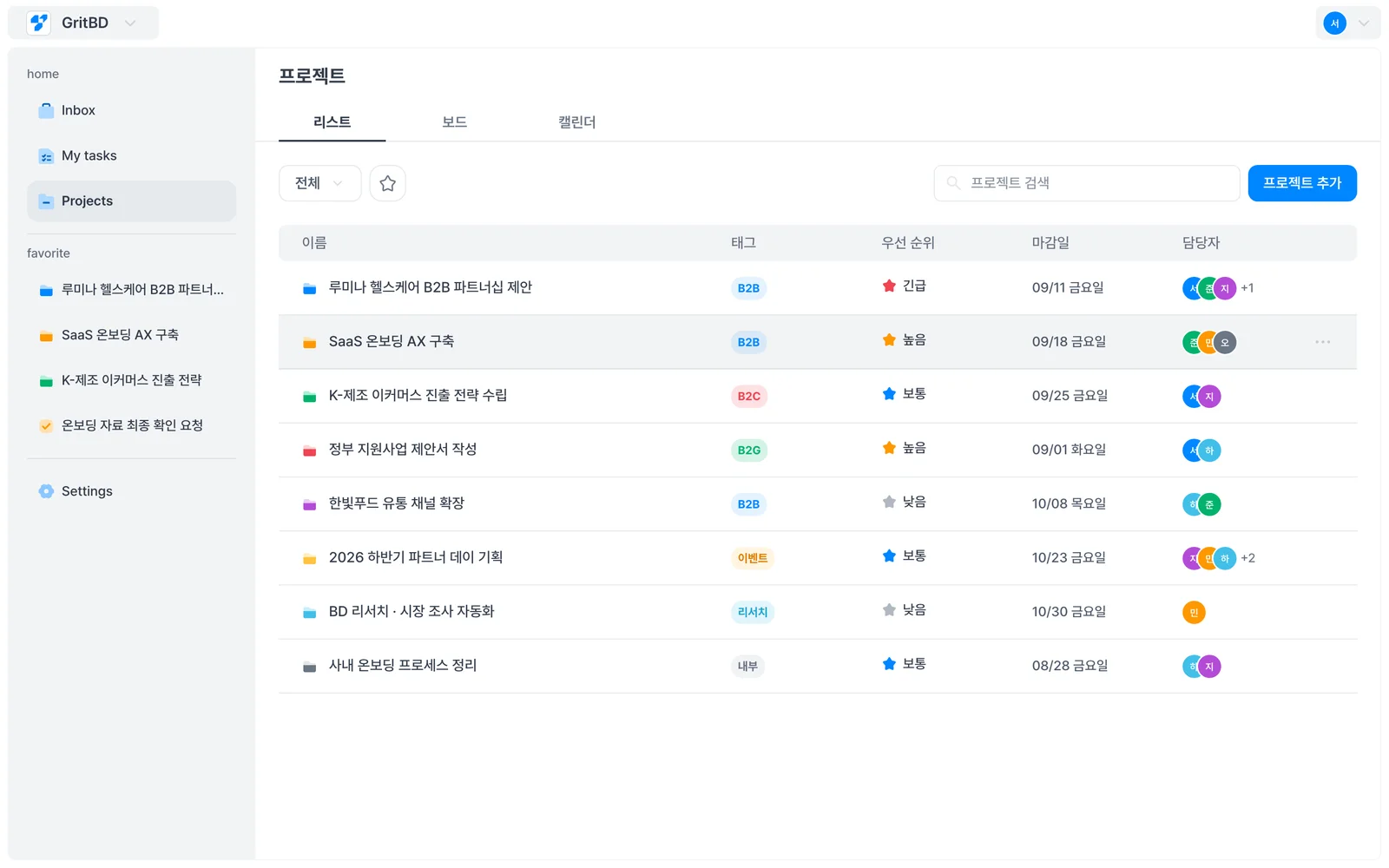
01 · Project PMS
See project status at a glance
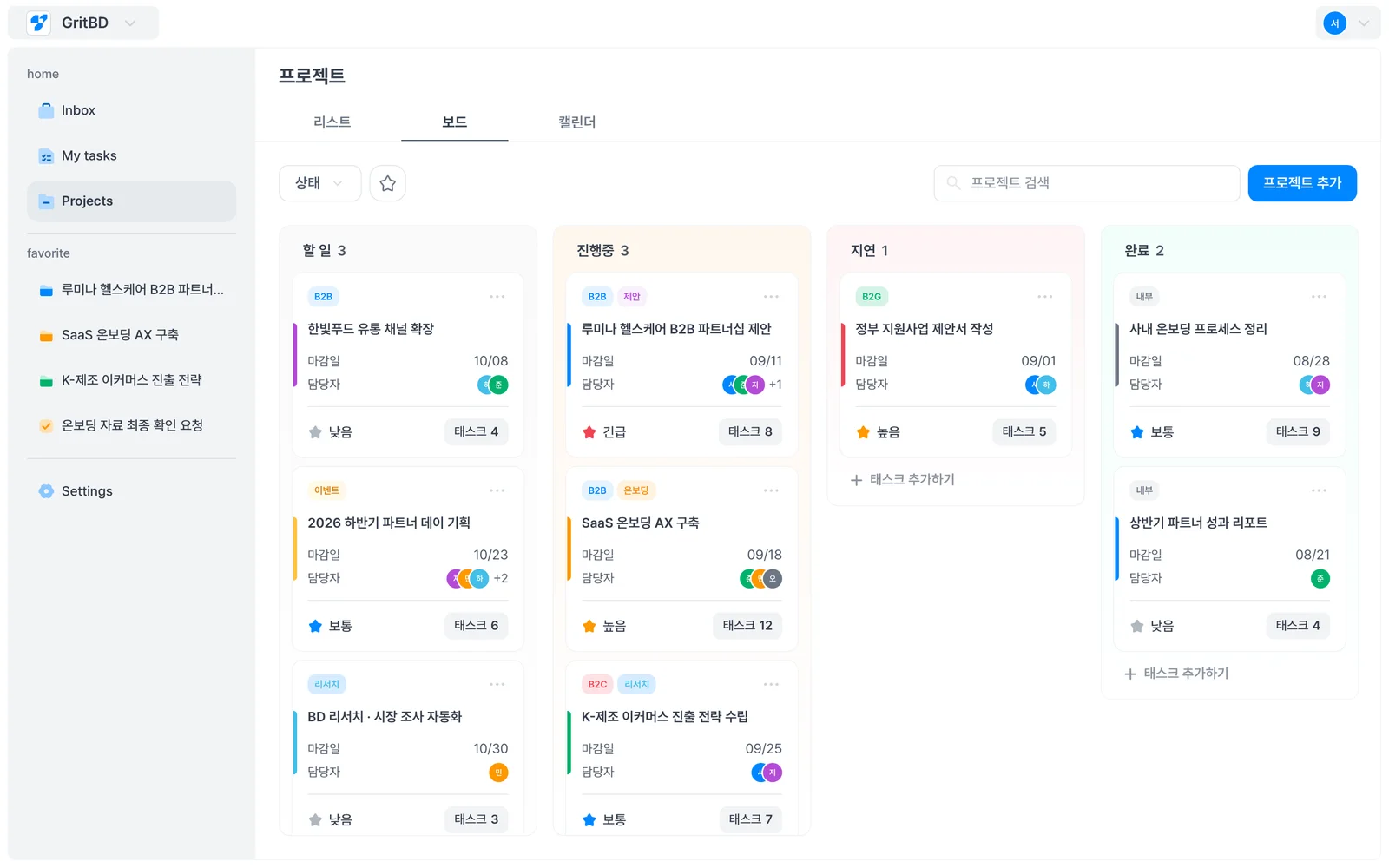
View key project information and progress in lists, boards or any format that fits your work.
- 1Check key information like tags, priority, due date and assignee
- 2Expand a project to see subtasks and progress
- 3Track status flow on boards and filter quickly
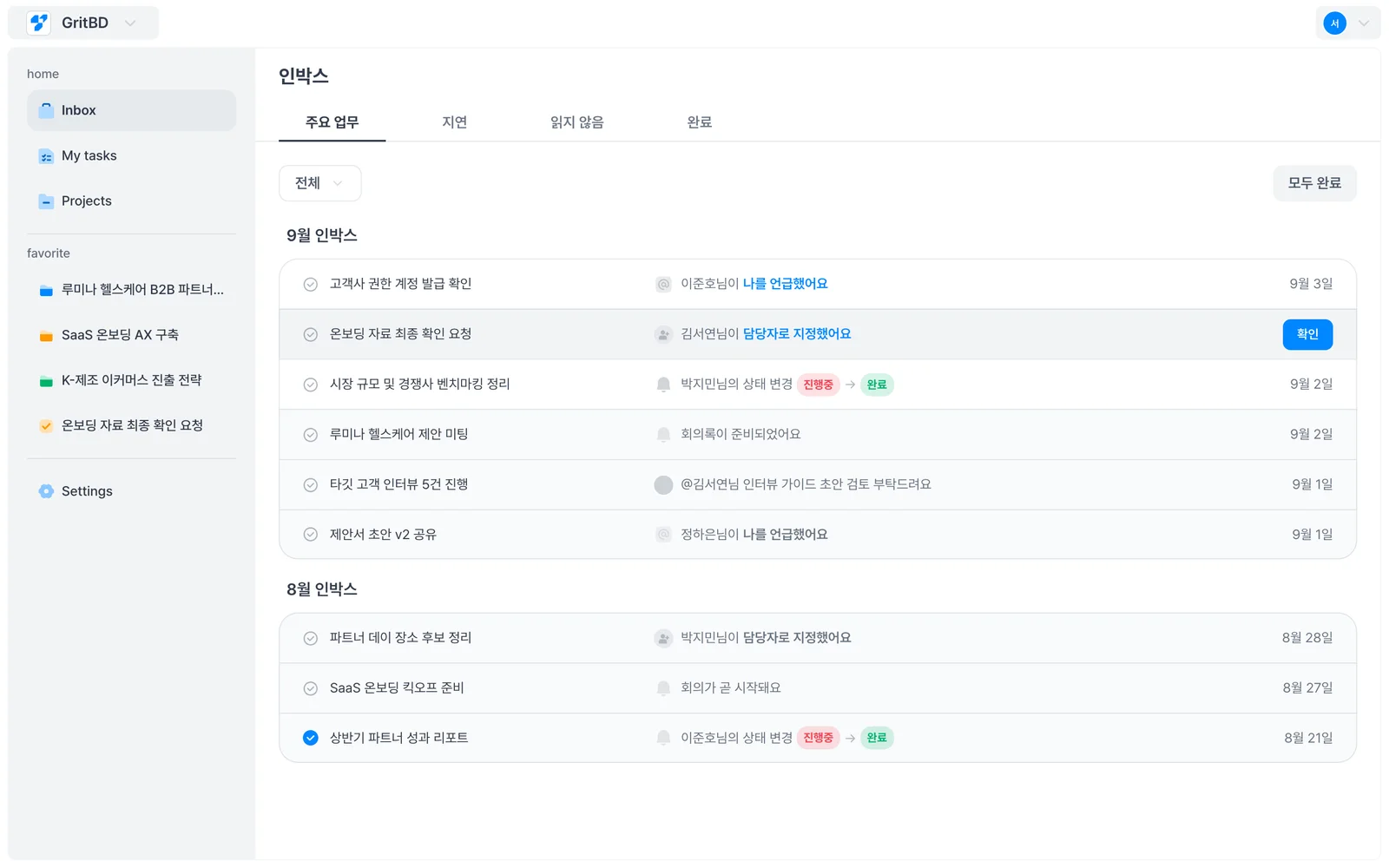
02 · Inbox
Catch task notifications and status right away
Never miss the notifications you need and see the current status of your tasks at a glance.
- 1Check key notifications like assignee changes, comments and status updates
- 2Sort notifications by tabs: key tasks, delayed, unread, done
- 3View notifications by project and jump straight to related tasks
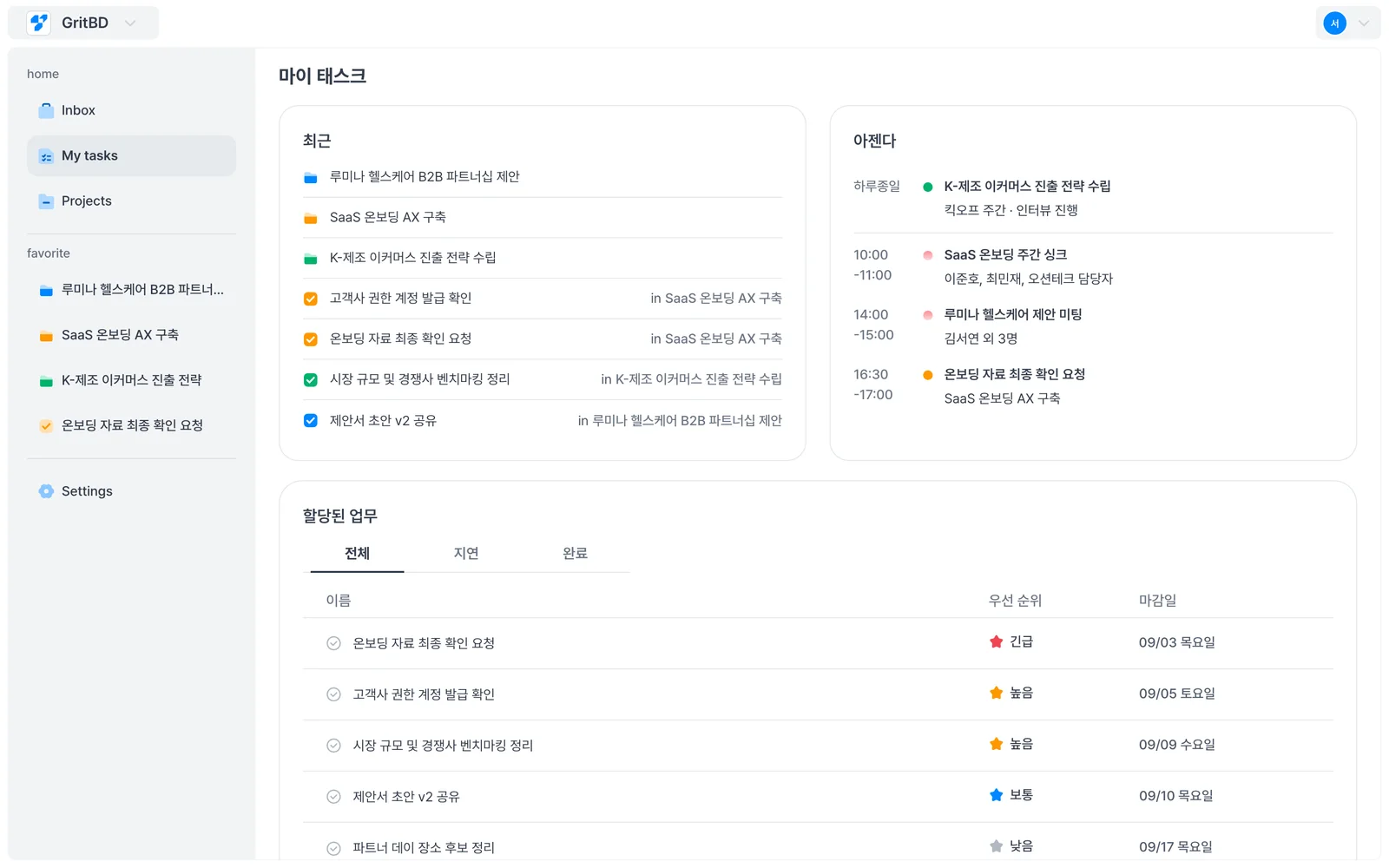
03 · My Tasks
See your assigned tasks and schedule together
View tasks assigned to you and today's schedule on one screen, and manage them by priority without missing anything.
- 1Quick access to recently created projects and tasks
- 2See today's schedule by time slot
- 3Manage assigned tasks by delayed/done status and priority
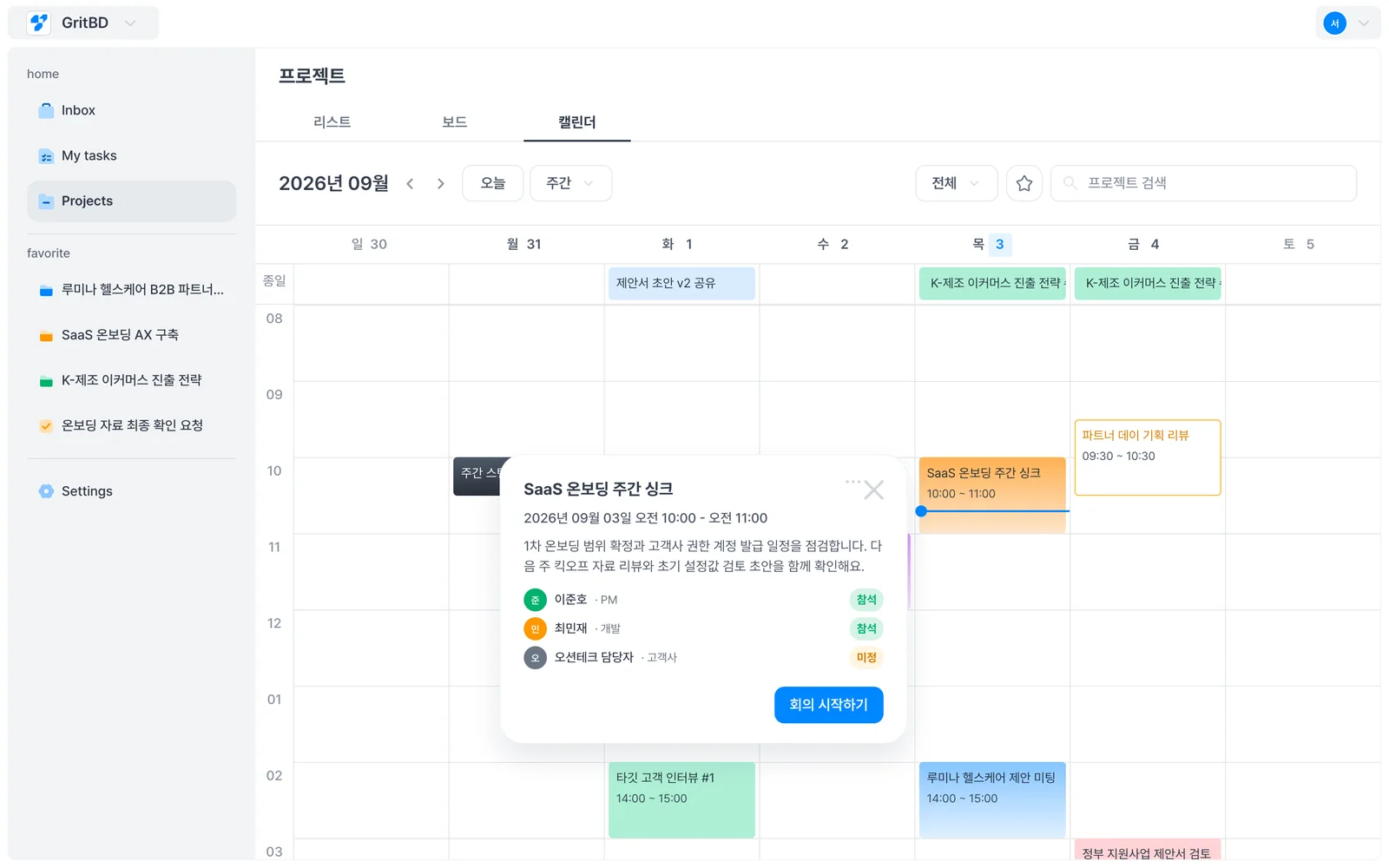
04 · Calendar
Manage all schedules on one screen
View project schedules, task due dates and meeting times in a single calendar, and manage them efficiently without missing anything.
- 1Integrate project, task and meeting schedules in monthly and weekly calendars
- 2Google Calendar integration automatically syncs meeting schedules and attendance responses
- 3Start a meeting right from the event details; finished meetings link to tasks
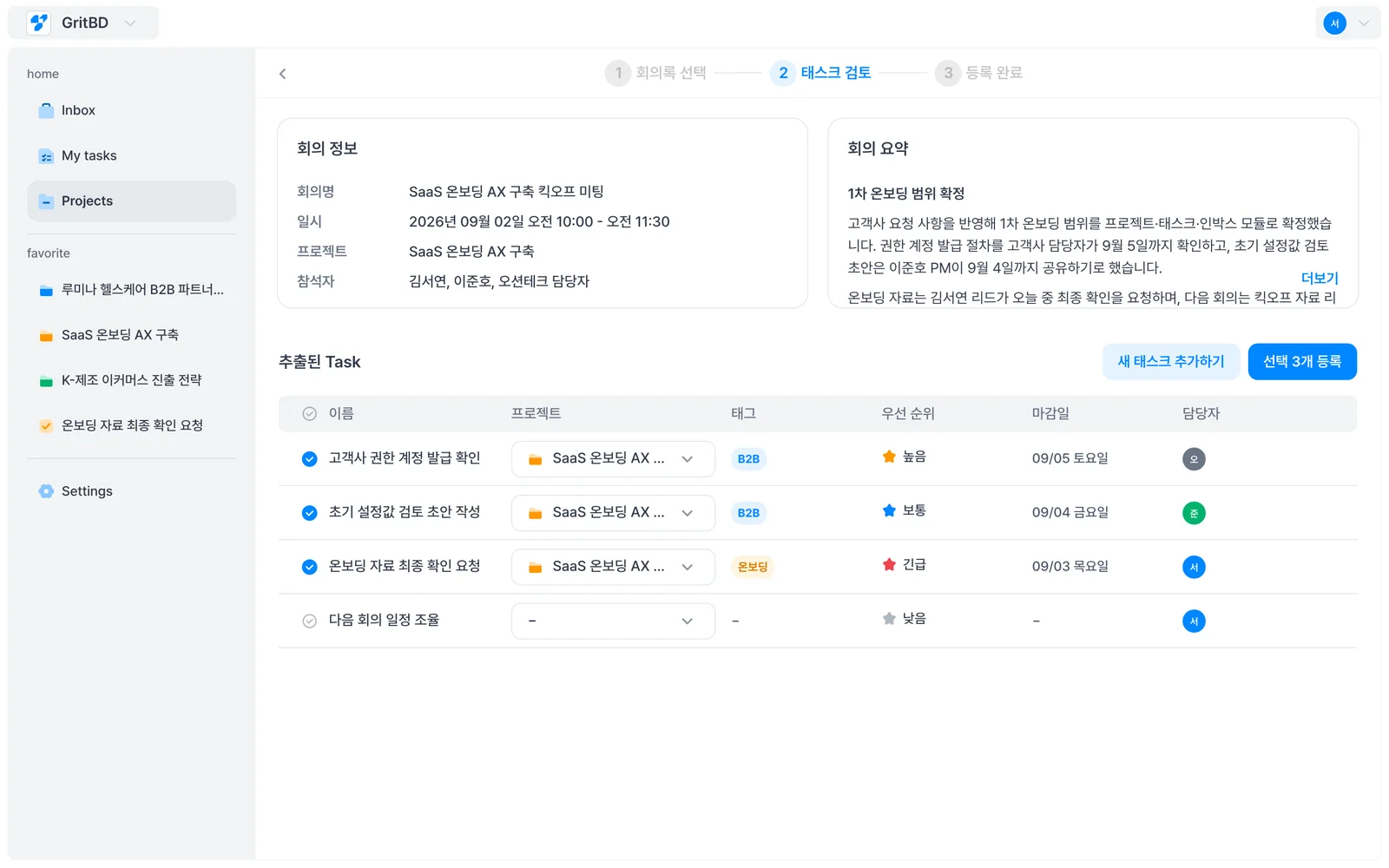
05 · Meeting to Task
Meetings automatically map to tasks
Turn meeting notes you import into decisions and follow-up work that can be added as actionable tasks.
- 1Upload a file or choose a Google document to generate a summary and task suggestions
- 2Review project, assignee, due date and priority, then register selected items
- 3Registered tasks appear immediately on project boards and My tasks
Workspace
Add a new workspace and
invite members to start collaborating
01
Create workspace
Create a new workspace to set up your work environment.
02
Invite members
Invite members and set up your team for collaboration.
03
Quick switching
Switch quickly between multiple workspaces as you work.
Get started now
With just a GritBD Hub account, you can create a workspace
and invite your team without approval.